
AI Speech Analytics and Transcription Services
October 6, 2026
CyRecord brings together each call’s recording, transcript, sentiment, and AI summary in one view.
Every call your team takes holds useful information: what the customer needed, how they felt, and whether your agent followed the process. CyRecord pulls all of that out for you automatically, so supervisors can spend less time searching through recordings and more time helping their teams improve.
One screen for every interaction
Open any call and you’ll see the agent, queue and caller details, plus contact information from your CRM if you’ve integrated one. The recording sits alongside a full transcript with the caller and agent clearly separated. Positive and negative moments are highlighted in green and red. Click any word in the transcript and the recording jumps straight to that point, so you can hear exactly where a conversation changed direction.
If the call started with an AI receptionist, the AI history appears here too. CyCX contact centre users can also follow the call’s full journey through queues, agents and hold events.
Summaries built your way
AI call summaries follow a template you control. Call Summary Studio lets you choose the sections you need, such as questions asked, actions and follow-ups, sentiment and mood. You can then apply each template to specific queues, agents, extensions or business units.
Sentiment you can act on
CyRecord looks at sentiment in three ways, so you can see how a call felt at a glance and then dig into the detail.
Sentiment highlighting. As you read the transcript, positive moments are highlighted in green and negative moments in red. You can spot the turning points in a conversation without listening to the whole recording.
Sentiment analysis. Every call gets a sentiment score for both the caller and the agent. On the compliance dashboard, these scores combine into an overall view of positive, negative and neutral sentiment across all your calls for the period you choose.
Sentiment profiles. Two calls can have almost the same score but very different stories. A sentiment profile splits each call into a beginning, middle and end, so you can see how the customer felt and how the agent responded at each stage. You can quickly find calls that ended badly and need a closer look. You can also find calls that turned around, which make great examples for team training. For more detail, use the sentiment timeline.
Sentiment timeline. Every call shows a separate sentiment timeline for the agent and the customer, in a ticker tape fashion where you can see the flow from positive, negative and neutral sentiment (or silence) along the journey of the call.
Read more about sentiment profiles
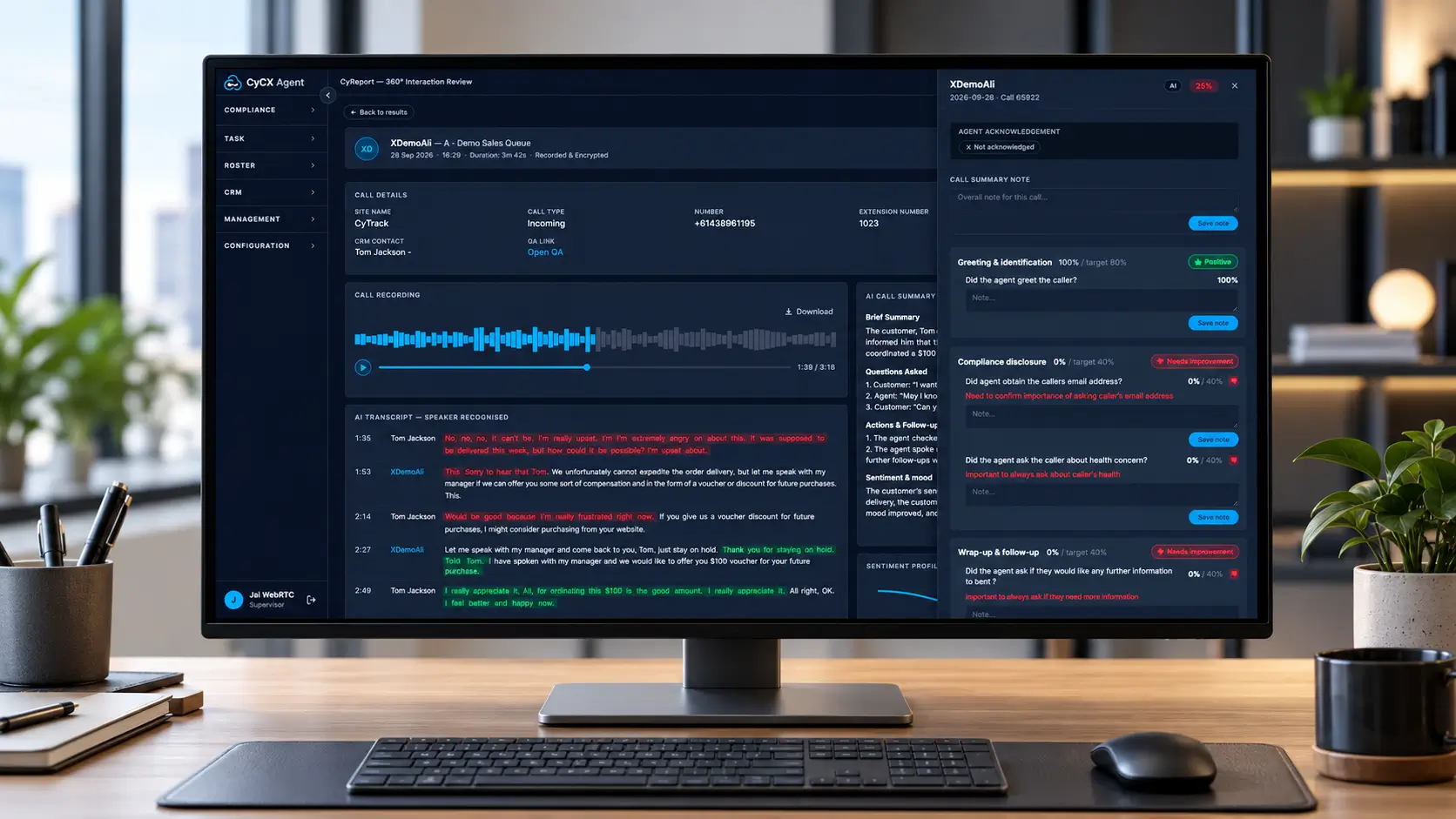
AI scores each call against your QA criteria and raises a coaching flag when it falls below your threshold.
QA scoring and coaching in one place
You set the QA criteria as weighted questions, grouped into areas like greeting, validation, compliance and wrap-up. Supervisors can score calls manually, or the AI QA scoring add-on can check every transcript against your criteria once the call ends. If a score falls below your threshold, CyRecord raises a coaching flag. Supervisors can then add notes and send feedback straight to the agent.
Agents can acknowledge the feedback or dispute it. Disputes come back to the supervisor for review, and scores can be adjusted where needed, so the whole conversation stays fair, transparent and on record.
Find any call in seconds
Ask AI lets supervisors search interactions in plain language. For example, you could ask for every call this month where a customer said “angry”, then filter the results by agent or sentiment.
CyCX users can also send post-call satisfaction surveys by email or SMS and see the results in each interaction report.
How CyRecord compares against standard transcription services
| Capability | Standard transcription | CyRecord Insights |
|---|---|---|
| Call transcription | ✓ | ✓ |
| AI Redaction | X | ✓ (optional) |
| AI Sentiment analysis | X | ✓ |
| AI Sentiment Timeline | X | ✓ |
| AI Sentiment Profiles | X | ✓ |
| AI Keyword / phrase detection | X | ✓ |
| AI Summarisation Studio | X | ✓ |
| AI QA & Coaching Module | X | ✓ |
| CRM integration | X | ✓ |
| Supervisor access & oversight | X | ✓ |
| Reporting | X | ✓ |
| Dashboards | X | ✓ |